Maintain Tax Groups |
| The Maintain Tax Groups routine allows the user to establish and maintain the
Tax Groups that are to be used throughout the system. Tax Groups are combinations of
Tax Structures; these combinations may make up a Compound Tax Structure, or may simply be
a combination of the taxes that are used in a specific area. Tax Groups are assigned to
specific areas (Offices) through the Maintain Office Tax Groups routine.
This routine should be used with caution, as it will affect all Billing amounts and
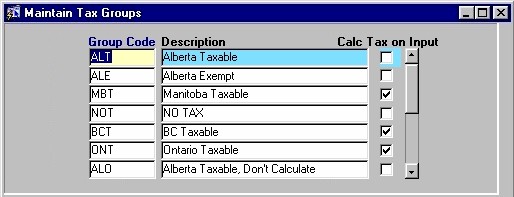
procedures. When the Maintain Tax Groups routine is accessed from the eQuinox main menu, the screen shown below will be displayed. |
| Field Definition |
 |
|
| Group Code The code assigned to the Tax Group (the Tax Group's unique identifier).
Description Calc Tax on Input |
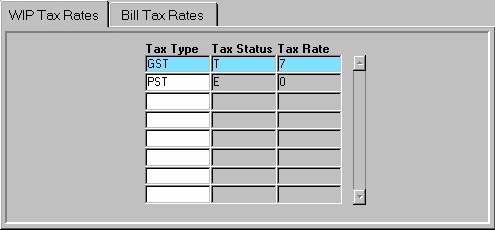
| The Bill Taxes and WIP Taxes tabs display details specific to the Tax
Group selected in the first section. For example, in the screen sections shown here, the
information in the WIP Taxes tab is specific to the Alberta Taxable Group (shown above in
blue). If the user were to select a different Tax Group, the information in the Bill Taxes
Tab and the WIP Taxes Tab would change to the details for the selected Tax Group. The Bill Taxes tab displays information about the individual Tax Structures that make up the selected Tax Group. Bill Taxes are the taxes applied to Client Bills. For more information on Bill Tax Rates, see the Glossary. The WIP Taxes tab displays information about the individual Tax Structures that make up the selected Tax Group. WIP Taxes are the taxes that are applied to Works In Progress. For more information on WIP Tax Rates, see the Glossary.
Note: To add new Tax Groups, the
user must first create the Group Code and Description, and then select the Taxes from the
Bill and WIP Tax Rates tabs that are to be included in the new Tax Group. A Tax Group cannot be
duplicated (i.e. you cannot have two "BC Taxable" Tax Groups), and Tax Groups
cannot be deleted if there are either Bill or WIP Tax structures associated with the Tax
Group, or if there are transactions currently in the system that involve that Tax
Group. |
|
| Tax Type The type of Tax Structure. This value will be displayed once the user makes a selection from the List of Values provided in the next field.
Tax Status Tax Rate |
| Once the user has finished entering or updating information, they must click the Save button or press F10 to commit the changes to the database. |