Maintain Task Billing Template |
| The Maintain Task Billing Template allows the
user to view and/or maintain Task Billing Templates. In eQuinox, firms are given the
option to bill clients on a Task basis. The process of Task Billing involves matters being
assigned a Task Bill Template. Task Bill Templates are broken down into Phases and those
Phases are then broken down into individual Tasks. This form houses the Task Bill
Templates and lists each Phase associated with each Template and subsequently, each Task
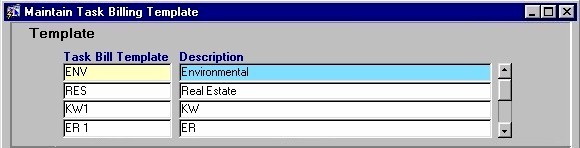
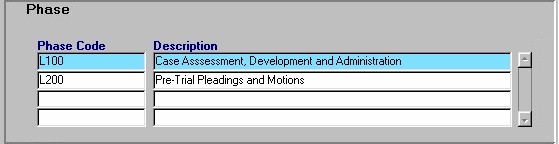
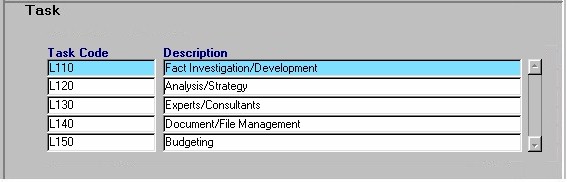
associated with each Phase. When creating a new Matter in the Maintain Matter Information form, the user has the option to select a Task Code to be applied to the Matter. The Task Codes that are defined and maintained through this Task Billing Template form are the options that appear in the Task Code List of Values on the Maintain Matter Information form. The Maintain Task Billing Template screen is divided into three sections; Template, Phase, and Task. The information displayed in the Phase section is specific to the selected record in the Template section. The information displayed in the Task section is specific to the selected record in the Phase section. For example, in the screen sections shown below, the Phases that are displayed are the Phases that are involved with an Environmental Matter (highlighted in the Task Bill Template section), and the Tasks that are displayed are the Tasks involved with the Case Assessment, Development, and Administration Phase (highlighted in the Phase section) of the Environmental Matter. When the Maintain Task Billing Template routine is accessed from the eQuinox main menu, the screen shown below will be displayed. |
| Field Definition |
 |
|
|
Task
Bill Template The code that identifies each Task Bill Template. The code itself may consist of a combination of numbers and letters. When defining new Task Bill Template Codes, the user must enter a unique code for each entry. The maximum length of a Task Bill Template Code is 10 characters.
Description |
|
|
Phase
Code The code that identifies each Phase associated with the specified Task Bill Template Code. The code itself may consist of a combination of numbers and letters. When defining new Phases within a Template, the user must enter a unique Phase Code for each entry. The maximum length of a Phase Code is 10 characters.
Description |
|
|
Task
Code The code that identifies each Task associated with the specified Phase. The code itself may consist of a combination of numbers and letters. When defining new Tasks within a Phase, the user must enter a unique Task Code for each entry. The maximum length of a Task Code is 10 characters.
Description Note: Task Bill Templates cannot be saved unless corresponding Phase Codes exist, and Phase Codes cannot be saved unless corresponding Task Codes exist. Also, duplicate Task Bill Templates, Phase Codes, or Task Codes cannot be entered and saved. |
| Once the user has finished entering or updating information, they must click the Save button or press F10 to commit the changes to the database. |