Maintain Nature Codes |
| The Maintain
Nature Codes routine allows the user to view and/or edit Nature Codes.
In eQuinox, Nature Codes are used to classify the nature of Matters (the
general topic/issue of the Matter or Nature of Practice). When opening a
Matter in the Maintain Matter Information routine, the user must
enter the Nature of the Matter; the Nature Codes maintained in this routine will be
displayed in the Matter Nature List of Values that the user must select from when entering
a new Matter. Note: Since
changing Nature Codes will affect all files, the user must exercise extreme caution when
modifying information on this screen. For example, if the user changes "Civil
Litigation" to "Marine Litigation", all Civil Litigation files will be
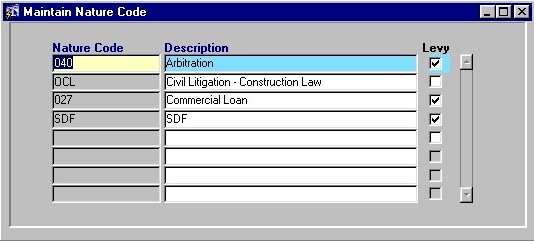
changed. When the Maintain Nature Codes routine is accessed from the eQuinox main menu, the screen shown below will be displayed. |
| Field Definition |
 |
|
| Nature Code The code representing a Matter Nature classification. The Code itself may be a combination of numbers and letters. When entering new records, the user must enter a unique Nature Code for each new entry. Description Levy |
| Once the user has finished entering or updating information, they must click the Save button or press F10 to commit the changes to the database. |