Maintain Case Management Templates |
| The Maintain Case Management Templates routine allows the user to define
the events, and the order in which these events must occur, for each type of case taken on
by the Firm. This is an optional feature; the user specifies whether or not
a Case Code is to be used for a Matter in the Maintain
Matter Information routine.
Since making changes to the settings that are regulated through this routine will affect
the entire system, it is available to only those users who have been granted access
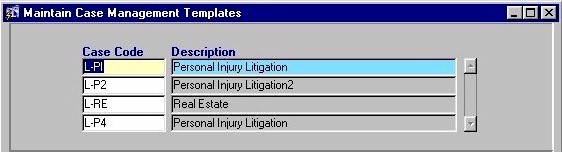
rights. When the Maintain Case Management Templates routine is accessed from the eQuinox main menu, the screen shown below will be displayed. |
| Field Definition |
 |
|
| Case Code The type of case (i.e. Commercial Litigation, Personal Injury Litigation). A selection may be made from the List of Values provided. Note: To add a new Case Code to the List, the user must enter the appropriate information in the Maintain Domain Definitions routine. Once that has been done, the user can select the new Case Code from the List of Values and then establish the details for that type of case using this routine. Description |
|
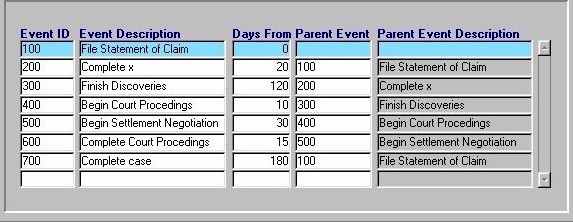
| Event ID The sequence of the Event. Events are identified by numbers, which indicate the order in which they must occur. Event
Description Days From Parent Event Parent Event Description |
| Once the user has finished entering or updating information, they must click the Save button or press F10 to commit the changes to the database. |