Maintain Interest Codes |
| The Maintain Interest Codes routine allows the user to view and/or maintain the
Interest Codes used by the system. Interest Codes represent different Interest Rates that
are to be charged to overdue Client Accounts after a specified number of days. When
opening a new Matter for a Client through the Maintain
Matter Information routine, the user has the option to select the Interest
Code to be applied to Client's Bill for that Matter. The Interest Codes maintained in this
routine will be the options presented to the user when selecting an Interest Code to be applied
to a Matter. Since making changes to Interest Codes affects the Outstanding Bill Amounts,
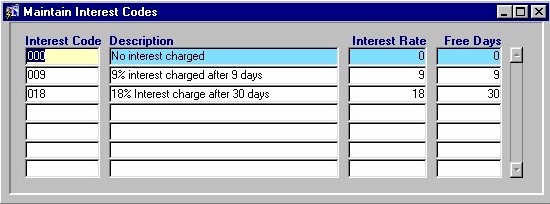
this routine is only available to those granted access rights. When the Maintain Interest Codes routine is accessed from the eQuinox main menu, the screen shown below will be displayed. |
| Field Definition |
 |
|
| Interest Code The code representing a particular Interest Rate record. Existing Interest Codes cannot be changed, but new Interest Codes may be entered.
Description Interest Rate Free Days |
| Once the user has finished entering or updating information, they must click the Save button or press F10 to commit the changes to the database. |