Maintain GL Posting Parameters |
| The Maintain GL Posting Parameters routine allows the user to set the details
for General Ledger postings that are to be used throughout the application. These settings
ensure that postings occur to the proper accounting month and year, and that only users
granted the proper authority can override the set system posting regulations (i.e. using
the Accounting and One Sided Journal Entry passwords). Since making changes to the parameters that are regulated through this routine will affect all Accounting and General Ledger transactions, balances, and records, it is available to only those users who have been granted access rights. For more information, see GL Posting Scenarios, which should be taken into consideration before making changes to Posting Parameters. When the Maintain GL Posting Parameters routine is accessed from the eQuinox main menu, the screen shown below will be displayed. |
| Field Definition |
 |
|
|
Auto
Post Month The number of the accounting month to which eQuinox currently posts all General Ledger Journal Entries. To change the Auto Post Month, the user may simply manually enter the number representing the new month. This feature allows the user to enter information into two accounting months. For example, the Firm may decide to keep their Month End open for a few days, allowing entries to be made to both the accounting month that is in the process of being closed, and the new accounting month. To enable this feature, keep the Current Month as the month that is being closed, and change the Auto Post Month to the new accounting month. Note: This feature is primarily for automatic postings by Non-Accounting staff, who do not have the option of selecting the posting month. Accounting Staff always have the option of selecting the posting month.
Auto Post Year NOTE: The Current Month and Current Year fields tell the user whether the current Accounting Year (i.e. as indicated in the Auto Post Month and Auto Post Year fields) is the same as the current Calendar Year. For example, a Firm's new Accounting Year starts in October 2003; after that date, postings will be made to Month 1, Year 2004, while the actual Calendar Date will be Month 10, Year 2003.
Current Month
Current Year |
|
|
Year
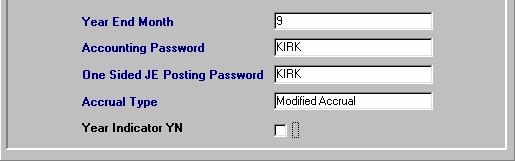
End Month The number of the calendar month which represents the Firm's Fiscal Year End. Once this month is reached, the Firm must begin their Year End procedures.
Accounting Password
One Sided JE
Posting Password
Accrual Type
Year Indicator YN Once the user has finished entering or updating information, they must click the Save button or press F10 to commit the changes to the database. The Accrual Basis of Accounting recognizes revenue in the period in which it is earned, and deducts in the same period the expenses incurred in generating this revenue. This type of accounting stresses the matching of revenue and related expenses. The alternative to using the Accrual Basis of Accounting is the Cash Basis, where revenue is not recorded until it is received in cash, and expenses are assigned to the period in which cash payment is made. |
|
|
|