Maintain Firm Parameters |
| The Maintain Firm Parameters routine allows the user to customize eQuinox to
suit the Firm's operating preferences. Since making changes to the parameters that are
regulated through this routine will affect the entire system, it is available to only
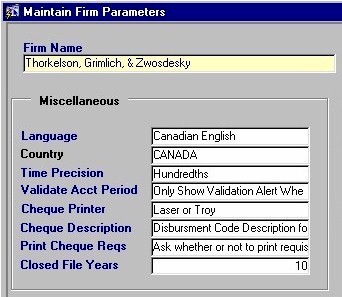
those users who have been granted access rights. When the Maintain Firm Parameters routine is accessed from the eQuinox main menu, the screen shown below will be displayed. |
| Field Definition |
 |
|
Firm
Name The name of the Firm or Company. This name will appear throughout the application, and on all printouts and reports. A selection may be made from the List of Values provided. Before the Firm Name appears in this list, it must first be created as an entity through the Entity Manager form.
Language |
|
Country The Country in which the Firm/Company is located. A selection may be made from the List of Values provided. The Country specified here will be used in the Firm/Company address.
Time Precision
Validate Acct
Period
Cheque Printer
Cheque Description
Print Cheque Reqs
Closed File Years |
|
|
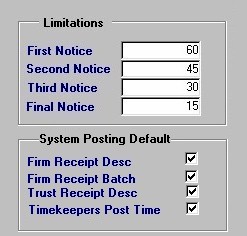
Limitations Limitation dates are used to remind the user of an upcoming event (usually used for collections reminders). The user must enter the number of days before the event (i.e. before collection procedures begin) that First, Second, Third, and Final Notices are to be sent. System Posting Default |
|
|
Interest
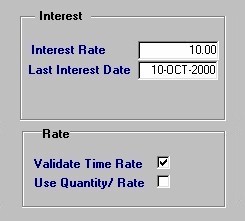
The Interest Rate field determines the amount of interest that is to be applied to Overdue Bills. The Last Interest Date field displays the date on which the interest rate was last entered. Overdue Bills that were rendered between the date entered here and the present date will be charged interest at the rate specified in Interest Rate field.
Rate |
|
|
Home
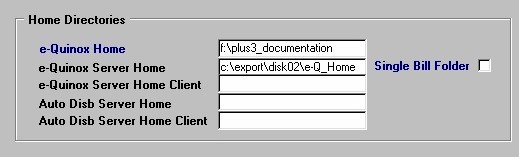
Directories The following fields hold the path of the directories in which e-Quinox information is stored. e-Quinox Home The directory on the users local machine in which e-Quinox output files (for billing, statements, etc) are stored. e-Quinox Server Home, Single Bill Folder The directory on the server in which the e-Quinox output files are stored. By default, e-Quinox places all bills on the accounting server in a directory path that is constructed as follows: <server drive>:\<e-Quinox Server Home>\<e-Quinox User Name>. This keeps all Bills separated by user. If the Firm would rather have a single Bill directory for all users, they must "check" the Single Bill Folder option; this will place all Bills on the accounting server in a directory path such as <server drive>:\<e-Quinox Server Home>
e-Quinox Server Home Client Auto Disb Server Home Auto Disb Server Home
Client |
|
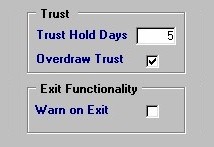
Trust The following fields hold information pertaining to Trust Monies. The number entered in the Trust Hold Days field indicates the number of days for which Trust Cheques are held for Clearing (number of days before they are cashed). The Yes/No (checked/unchecked) value of the Overdraw Trust field indicates whether or not Trust Accounts may be overdrawn.
Exit
Functionality |
|
| Once the user has finished entering or updating information, they must click the Save button or press F10 to commit the changes to the database. | |