Maintain Domain Definitions |
| The Maintain Domain Definitions routine allows the user to view and/or maintain
Domain Definitions. In eQuinox, Domains are used to "group" options in Lists of
Values, Look-ups, etc. For example, when looking up a General Ledger Account Type, the
user would be presented with a List of Values containing all options in the Account Type
Domain. While most Domain Definitions are not updateable by the user, the user is able to enter additional Domain Definitions. For example, if the Firm decides to use more 'Address Types' than are currently defined in the system, the new 'Address Types' can be added to the Address Type Domain. When the Maintain Domain Definitions routine is accessed from the eQuinox main menu, the screen shown below will be displayed. |
| Field Definition |
 |
| Note: When updating/editing Domain Definition options, all Lists of Values in the system associated with that Domain definition will be affected. |
|
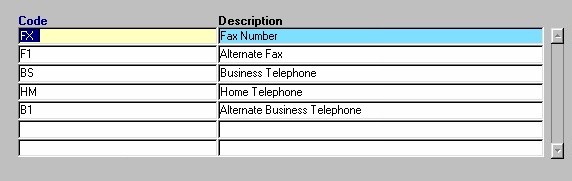
| Definition Name From the list provided, the user must select the name of the domain definition for which they wish to view and/or edit information. After making a selection, a query will automatically be executed, and the associated information will be displayed in the screen section explained below. For example, to view the domain definitions that make up the "Telephone Type" definition, the user must select that option from the list. Max Code Length Internal |
|
| Code The abbreviation for the Domain option. This is the value that appears in the Lists of Values throughout the application. For example, in Lists of Values pertaining to setting the Telephone Types in the system, the user will be presented with the five options seen in the screen section above. When adding new Domain Definition options, the user must enter a unique code. Description |
| Once the user has finished entering or updating information, they must click the Save button or press F10 to commit the changes to the database. |