Maintain Disbursement Codes

Return to the Administration Menu

The Maintain Disbursement Codes routine allows the user to establish and maintain Disbursement Codes that are to be used throughout the system. Since making changes to Disbursement Code information affects the entire system, this routine is only available to those users who have been granted access rights.
 
When the Maintain Disbursements Codes routine is accessed from the eQuinox main menu, the screen shown below will be displayed.
 
Field Definition

Maintaining Disbursement Codes

Code
The unique identifier for each type of Disbursement.

Description
A description of each type of Disbursement.

Unit Rate
The amount that is charged to the Client's Matter each time a Disbursement of this type is incurred.

Tax Group
The Tax Group which is to be applied to the charges incurred for this type of Disbursement. A selection may be made from the List of Values provided.

Default GL
The General Ledger Account to which transactions for this type of Disbursement are posted by default. A selection may be made from the List of Values provided.

Maintaining Disbursement Codes

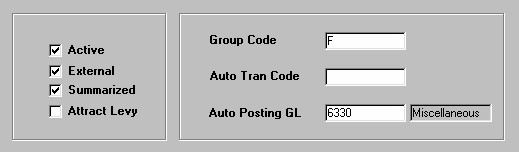
Active
The Yes/No (checked/unchecked) value of this field indicates whether or not the Disbursement Code is Active (i.e. if the field is 'checked', the code is in use throughout the system, if the field in 'unchecked', the code is no longer in use throughout the system).

External
The Yes/No (checked/unchecked) value of this field indicates whether or not this type of Disbursement is an External or Internal cost to the Firm (i.e. Photocopies would be considered an Internal Cost, while Courier Services would be considered an External Cost).

Summarized
The Yes/No (checked/unchecked) value of this field indicates whether or not transactions for this type of Disbursement are to be summarized on Bills, Reports, etc (i.e. as opposed to each individual transaction listed in detail).

Attract Levy
The Yes/No (checked/unchecked) value of this field indicates whether or not a Disbursement of this type attracts an additional charge to the Client (i.e. Transaction Levy Surcharges for Firms in Ontario).

Group Code
The code that represents the group to which the Disbursement type belongs (i.e. If the Disbursement type is Fax, the user would select "F" from the list of values, which represents the Fax Disbursement Group. These Disbursement Groups are established and maintained in the Domain Definitions routine; to add more Groups, the user must do so through that routine.

Auto Tran Code
The code that represents the type of Automatic Disbursement Polling device (if any) that is used to track Disbursement transactions of this type (i.e. If the Disbursement type is Postage, the user would select "P" from the list of values, which represents the Postage Meter).

Auto Posting GL
The General Ledger Account to which transactions for this type of Disbursement are automatically posted. A selection may be made from the List of Values provided.

Once the user has finished entering or updating information, they must click the Save button or press F10 to commit the changes to the database.

Return to the Administration Menu